Menus and options
Every APIExpose option lives inside the EmulationStation menus, under EXTENDED OPTIONS (Main menu → Advanced game settings). This page documents all of them, submenu by submenu, in the order they appear.
The master switch
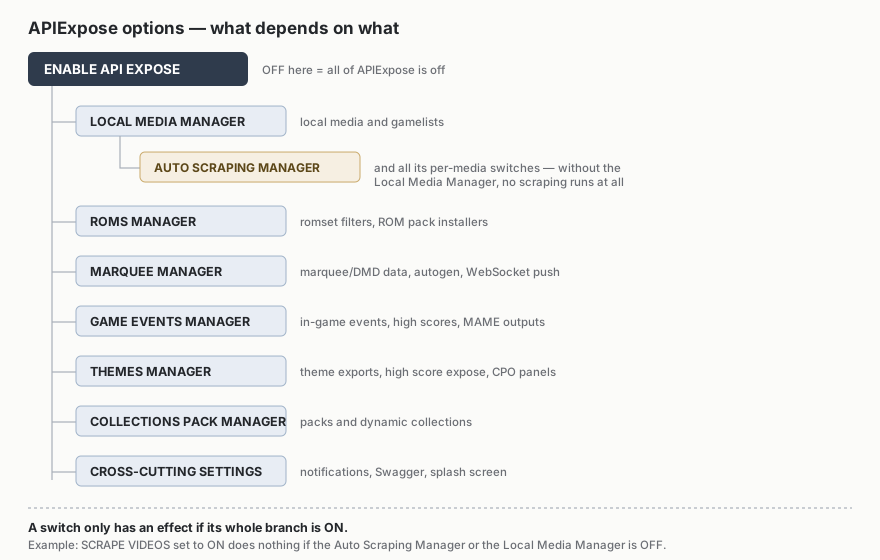
ENABLE API EXPOSE enables or disables all the plugin's advanced features. Everything else depends on it.
Switches form a hierarchy: each manager is the gateway to its options, and an option only takes effect when its whole branch is enabled.
LOCAL MEDIA MANAGER
The local media manager: which media get linked into your gamelists and how they are chosen.
| Option | Choices | Effect |
|---|---|---|
ENABLE LOCAL MEDIA MANAGER |
on/off | Enables local media management, canonical media links and gamelist updates. |
MAIN IMAGE |
SCREENSHOT, SCREENTITLE, MIX 1/2, BOX 2D/3D, FANART | The media shown as each game's main image. |
LOGO / MARQUEE |
WHEEL HD, LOGO, MARQUEE, SCREEN MARQUEE (SMALL), STEAMGRID, FIGURINE, CARTRIDGE, LABEL | The media linked into the gamelist marquee tag. |
THUMBNAIL |
BOX 2D/3D, FIGURINE, CARTRIDGE, LABEL, SCREENSHOT, SCREENTITLE, MIX 1/2 | The media linked as thumbnail. |
WHEEL HD STYLE |
CARBON, STEEL | The wheel variant used when LOGO / MARQUEE = WHEEL HD. |
MEDIA REGION MODE |
MATCH ROM REGION, CONTENT REGION PROFILE, INTERFACE LANGUAGE | How localized media are picked: ROM region first (default), region profile, or interface language. |
LOGO / WHEEL LOCALIZATION |
USER LANGUAGE, MATCH ROM REGION, CONTENT REGION PROFILE | Logos/wheels favor your language (default) or the ROM's original region. |
CLEAN LEGACY ROMS MEDIA |
on/off | At startup, asks (Windows confirmation) before migrating legacy roms-folder media to the canonical store, deleting only hash-verified duplicates. |
AUTO SCRAPING MANAGER
Scraping: local first, remote when needed, each media type toggled separately.
| Option | Effect |
|---|---|
ENABLE AUTO SCRAPING MANAGER |
Enables local then remote scraping, with live game-view updates when a real change is found. (on by default) |
ENABLE SCREENSCRAPER |
Lets ScreenScraper fill the store when local scraping is not enough. |
TRANSLATE DESCRIPTIONS |
Translates English descriptions when your language has no localized one. |
ENABLE SCRAPING QUEUE |
Low-priority background scraping queue - it pauses during live scraping. |
REMOTE SCRAPE AFTER LOCAL |
Remote scraping starts only if the local pass leaves gaps. |
SCRAPE EXACT LOCAL MEDIA |
Fetches the exact regional media when a visible slot is only served by a local fallback. |
REFRESH GAME VIEW AFTER SCRAPE |
Refreshes the current game view after a successful remote scrape. |
NOTIFY MEDIA SCRAPE |
Notifies when a heavy media scrape completes: manual, magazine or video. |
Each media type then has its own switch: SCRAPE MARQUEES, SCREEN MARQUEES, SMALL SCREEN MARQUEES, STEAMGRID, MIX, MAPS, MANUALS, MAGAZINES, VIDEOS, NORMALIZED VIDEOS and BEZELS.
Large files
Videos are on by default; manuals, magazines and normalized videos stay opt-in. These files are larger than other media: turn them off if disk space is a concern. If a media type is chosen as a visible source (e.g. MARQUEE in LOGO / MARQUEE), its scraping stays priority even as plain enrichment.
ROMS MANAGER
The list cleaner: ready-made profiles plus explicit per-category filters.
| Option | Choices | Effect |
|---|---|---|
ENABLE ROMS MANAGER |
on/off | Enables the romset management and filtering module. |
ROMS PROFILE |
CASUAL GAMER, GAMER, HARD-GAMER, PRO-GAMER, RETROACHIEVER, LOCALIZED PLAYER, ARCADE PURIST, ARCADE GAMER, HISTORIAN, PRESERVATIONIST, HOMEBREW PLAYER, MODDER, HACKER | A named preset that positions every filter at once - options stay visible and adjustable afterwards. |
NEVER HIDE FAVORITES |
on/off | Your favorites are never hidden by filters. (on by default) |
LANGUAGE |
SHOW ALL / SHOW ONLY MY LANGUAGE | Hides other languages when a version in yours exists. |
REGION |
SHOW ALL / SHOW ONLY MY REGION | Hides other regions when a version from yours exists. |
RETROACHIEVEMENTS GAMES |
NO FILTER / ALWAYS SHOW / SHOW ONLY | ALWAYS SHOW protects RA-compatible games; SHOW ONLY hides games without a cheevosId. |
ROM VERSION |
STABLE, LATEST, ORIGINAL, ENHANCED | How variants of the same game are scored. |
Each category is then a SHOW/HIDE switch: OFFICIAL GAMES, CLONES, PROTOTYPES, DEMOS, BETA / ALPHA, USEFUL PATCHES (bugfix, QoL, widescreen…), HACKS AND MODS, CHEATS AND TRAINERS, BOOTLEGS AND PIRATES, UNLICENSED, HOMEBREWS AND AFTERMARKET, ADULT, CASINO AND GAMBLING, MAHJONG, QUIZ, NON-GAMES (BIOS, devices…), UNKNOWN ROMS, ARCADE TESTS AND DIAGNOSTICS.
Advanced romset options (version dependent)
The module also includes: VARIANT MODE (OFF / DISPLAY ONLY / HIDE VARIANTS - DISPLAY ONLY analyzes without writing), TRANSLATIONS (a translation may become the main variant if it matches your language), ARCADE HANDLING (parent only, best clone, parent/clone group), ROM SET OUTPUT (report only, gamelist hidden tag, collection, or API filter) and ROM SET DEBUG REPORT (JSON report with decisions and scores).
Pack installation (Roms Pack Manager)
| Option | Effect |
|---|---|
ROM INSTALLER |
Installs ROM/media/gamelist packs found in package-installer\ at startup (.7z, .zip, .rar), using a hash index. |
UNZIP ROMS |
Extracts ROM archives into the system roms folder. By default, ROM .zip/.7z files are kept as-is. |
ON-THE-FLY ROM INSTALLER |
NEVER / GAME START (extraction right before launch) / GAME SELECTED (preload on selection). |
RESET ROM AFTER GAME END |
An on-the-fly ROM goes back to a lightweight placeholder after the game ends. |
CABINET SETTINGS
Filters tied to your screen and physical cabinet.
| Option | Choices | Effect |
|---|---|---|
SCREEN / COCKTAIL ORIENTATION |
NO FILTER, ONLY HORIZONTAL, ONLY VERTICAL, ONLY COCKTAIL, HIDE COCKTAIL | Filters arcade games by display orientation. |
BEZEL ORIENTATION |
MATCH CABINET, HORIZONTAL, VERTICAL, COCKTAIL | Orientation of ScreenScraper bezels. |
BEZEL ASPECT |
16:9, 4:3 | Aspect ratio of downloaded bezels. |
MULTI-SCREEN GAMES |
NO FILTER / ONLY / HIDE | Games with multiple screens. |
FUNCTIONAL SECOND SCREEN |
NO FILTER / ONLY | Keeps only games where a second screen serves gameplay. |
WIDE OR SURROUND DISPLAY |
NO FILTER / ONLY | Games needing a wide or extended display. |
PORTABLE LINK GAMEPLAY |
NO FILTER / ONLY / HIDE REQUIRED LINKS | Games using VMU, GBA/DS link or portable second-screen gameplay. |
CABINET CONTROL COMPATIBILITY |
NO FILTER / ONLY COMPATIBLE | Hides games requiring controls missing from your Control Panel Manager profile. |
PLAYER COUNT COMPATIBILITY |
NO FILTER / ONLY COMPATIBLE | Hides games requiring more players than your declared panels. |
BUTTON COMPATIBILITY |
NO FILTER / ONLY COMPATIBLE | Hides games requiring more buttons than declared. |
CONTROL PANEL MANAGER
Describe your cabinet once: compatibility filters, themes and LED panels use it afterwards.
| Option | Choices |
|---|---|
CABINET PROFILE |
GENERIC ARCADE, FIGHTING, NEO GEO, COCKTAIL TABLE, DRIVING, LIGHTGUN, RHYTHM, DANCE, TWIN STICK, TRACKBALL, SPINNER, MULTI-SCREEN, CUSTOM |
CONTROL PANELS |
1 to 6 player panels (default: 2) |
BUTTONS PER PLAYER |
0 to 12 buttons (default: 6) |
Then declare your controls: ARCADE JOYSTICK (on by default), ANALOG JOYSTICK, ROTARY JOYSTICK, SPINNERS, TRACKBALLS, WHEELS, PEDALS, SHIFTERS, LIGHTGUNS, DANCE MATS, GUITARS, DRUMS, TURNTABLES, MICROPHONE, KEYBOARD, MOUSE, TOUCHSCREEN, MOTION CONTROLLER.
Finally, publication to other tools:
| Option | Effect |
|---|---|
ENABLE CONTROL PANEL DISPLAY |
Publishes the resolved panel layout for themes and LED panels. |
PUSH CONTROL PANEL TO WS STREAM |
Pushes that layout into the WebSocket stream on each system or arcade-game selection - this is what LedManager consumes. |
COLLECTIONS PACK MANAGER
Ready-to-use collection packs (media and game families) are published on HyperBat Media by Christophe.
| Option | Effect |
|---|---|
ENABLE COLLECTIONS PACK MANAGER |
Enables the collection pack installer. |
COLLECTION PACK INSTALLER |
Installs packs from package-installer\collections\<theme>\ at startup. |
DYNAMIC COLLECTIONS |
.xcc collections auto-fed by the gamelist family tag. Recommended mode. |
STATIC COLLECTIONS |
custom-*.cfg collections with exact paths. Compatibility mode, not self-feeding. |
ENABLE FOR THEMES |
Applies a collection's system theme to its family games without a dedicated theme. |
THEMES MANAGER
On the EmulationStation theme side, see HyperBat by phenix.
| Option | Effect |
|---|---|
ENABLE THEMES MANAGER |
Enables consolidated .gameinfos exports for CPO panels and high scores. |
ENABLE HIGH SCORE EXPOSE |
Updates high score rows in the .gameinfos XML. |
EXPORT .HISCORE |
Also writes hiscores to the folder expected by legacy themes. |
ENABLE THEME DEPLOYMENTS |
Allows scraping, installation and automatic deployment of themes declared by APIExpose. |
REFRESH GAME VIEW AFTER INSTALL |
Refreshes the game view after a collection or theme installation. |
MARQUEE MANAGER
The APIExpose side that feeds marquees (the MarqueeManager plugin displays them).
| Option | Choices | Effect |
|---|---|---|
ENABLE MARQUEE MANAGER |
on/off | Enables data management for marquee clients. (on by default) |
PUSH MARQUEE DATA TO WS STREAM |
on/off | Streams marquee, logo, fanart and game context over WebSocket. |
MARQUEE AUTOGEN |
NO, XL 1920×360, L 1280×400, M 920×360 | Generates a custom marquee (fanart + logo) when no real marquee exists. |
SYSTEM MARQUEE BACKGROUND |
on/off | Generated system marquees use the theme fanart/background (otherwise black). |
DMD AUTOGEN |
NO, 64×32, 128×32, 128×64, 256×64 | Generates a system or game DMD image when no dmd.png exists, at your matrix size. |
MARQUEE AUTOGEN NOTIFY |
on/off | ES notification when a marquee is generated. |
ZeDMD 128×32?
Set DMD AUTOGEN to your panel's physical size - it is the setting that guarantees crisp rendering on the MarqueeManager side.
GAME EVENTS MANAGER
Real-time in-game events - the raw material of live scores and LEDs.
| Option | Effect |
|---|---|
ENABLE GAME EVENTS MANAGER |
Enables game event listening, RetroArch included. Without it, console high scores cannot be captured. |
ENABLE IN-GAME EVENT LISTENER |
Listens to in-game events (RAM reading through the wrapper) for compatible systems. |
CAPTURE CONSOLE HIGH SCORE |
Captures in-game SCORE signals on compatible consoles. |
ENABLE ARCADE EVENT LISTENER |
Listens to arcade outputs (MAME lamps…) from compatible emulators. |
EXPORT SCORE ON GAME-END |
Writes the captured score into .gameinfos at game end. |
MAX HIGH SCORES |
5, 10, 20 or 50 rows kept per game (default: 10). |
SHOW WORLD SCORING COLLECTION |
Shows the NELFEPLAY WORLD SCORING collection in the carousel (default: on). |
The NELFEPLAY WORLD SCORING collection
A game only enters it when the three conditions hold at the same time: a scoring profile is open and not suspended on NelfePlay, you own the ROM, and this cabinet holds exactly the score definition the profile requires. The third condition avoids promising a score that would be refused at the end of the run; the game comes back on its own once the official definition is up to date.
The cabinet downloads a public index of open games and does the matching locally: no list of your ROMs is ever sent. Offline, the last valid collection is kept, and an outage is never read as an empty list. Turning the option off removes the collection file and the carousel entry, and leaves your other collections untouched.
To diagnose: http://127.0.0.1:12345/api/v1/nelfeplay/scoring-collection reports disabled,
empty, ready, stale or error, with the remote and local game counts. Add
?refresh=true to force a synchronisation. Logs live in .log.
Your theme must know the collection name to give it its own tile: APIExpose adds it to the
theme's collections.info and drops the logo and background there. A theme that does not
support custom collections keeps a generic rendering.
API SETTINGS
Cross-cutting settings, deliberately last.
| Option | Effect |
|---|---|
LANGUAGE PROFILE |
Your central language profile (16 choices) - used by filters, metadata localization and every service. |
REGION PROFILE |
Your central region profile (20 choices) - same role for regions. |
REPAIR GAMELISTS ON STARTUP |
Startup pass realigning visible media slots and localized gamelist texts. |
SYNC GAMELISTS WITH SYSTEM LANGUAGE |
When the ES language changes, gamelists are realigned in the new language. |
SHOW API SPLASHSCREEN |
APIExpose overlay during initialization. |
SHOW TOAST NOTIFICATIONS |
Toast notifications over EmulationStation. |
SHOW API NOTIFICATIONS |
Native notifications through the ES notify API. |
SHOW TOAST PROGRESS BARS |
Progress bars during long operations. |
ENABLE SWAGGER |
Enables the Swagger UI at http://127.0.0.1:12345/swagger/index.html. |
WebSocket stream always on
The real-time stream ws://127.0.0.1:12345/ws no longer has a menu switch: turning it off silently broke marquee and LED clients. It can still be controlled in appsettings.json for debugging.