Per-game panels and wiring
The My games tab of LedManager Setup customizes one game's panel: its colors, and for arcade its full wiring - which game actions land on which buttons, which lamps light where.
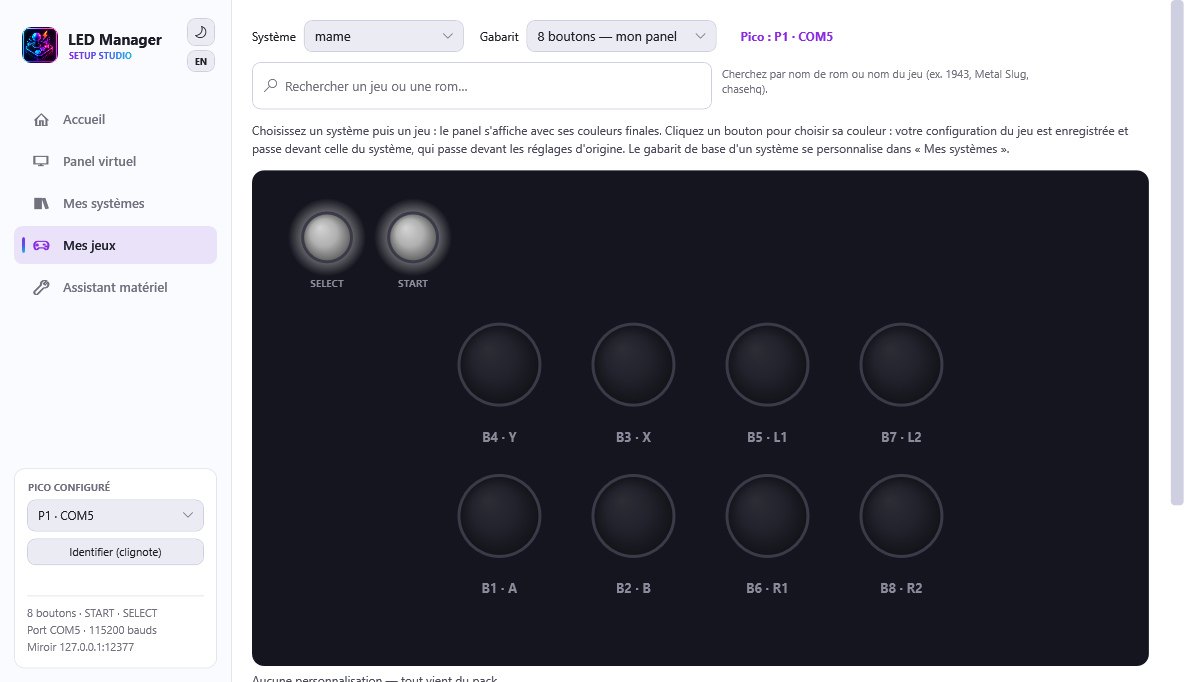
Picking a game
- Select the system (arcade:
mame…; consoles:snes,megadrive…). - The template follows your real panel; you can preview the 2/4/6/8-button layouts and a system's special templates.
- Type in the search box (game or rom name) and pick from the list.
The panel shows the final colors (pack + your system configuration + your game
configuration). Click a button to change its color - saving writes a light patch under
overrides\; the Data Pack is never modified.
The wiring bay (arcade)
Below the panel, the wiring bay shows the game like a cabinet:
- on the left, the game actions (cyan);
- in the center, the panel: SELECT/START and the buttons, in the game's colors;
- on the right, the native lamps (MAME), grouped by family - fully unwired families are folded, click the header to open them;
- at the bottom, the peripherals (joystick with its ways, wheel, pedal…) with one socket per axis.
Key gestures:
- Drag a socket to a button: the cable snaps. An action can sit on several buttons; a lamp re-homes (including onto START/SELECT).
- Remove a link: drop again on the wired button, or drop in the void to return to the original setting.
- Click a chip, a button, a peripheral or START/SELECT to see its ramifications (echoed on the virtual panel, and on the real one during a live test).
- Double-click a chip: technical details of the channel.
- Dashed = current setting · solid = your change.
"Save the wiring" stores your configuration; "Update this game" (the Controls card) pushes it into the emulator. The Repair this game button realigns a MAME configuration broken by a version change, by querying your installed MAME - your settings are preserved.
Test my system
In My systems, the "Test my system" button launches the selected system's controller diagnostic rom: press every panel button to verify the wiring end to end. The programs come from the ES-Panels collection (see its credits and origins).