Designer guide
The Designer follows a layers logic (think Photoshop): a canvas in the middle, an elements palette on the left, layers and properties on the right.
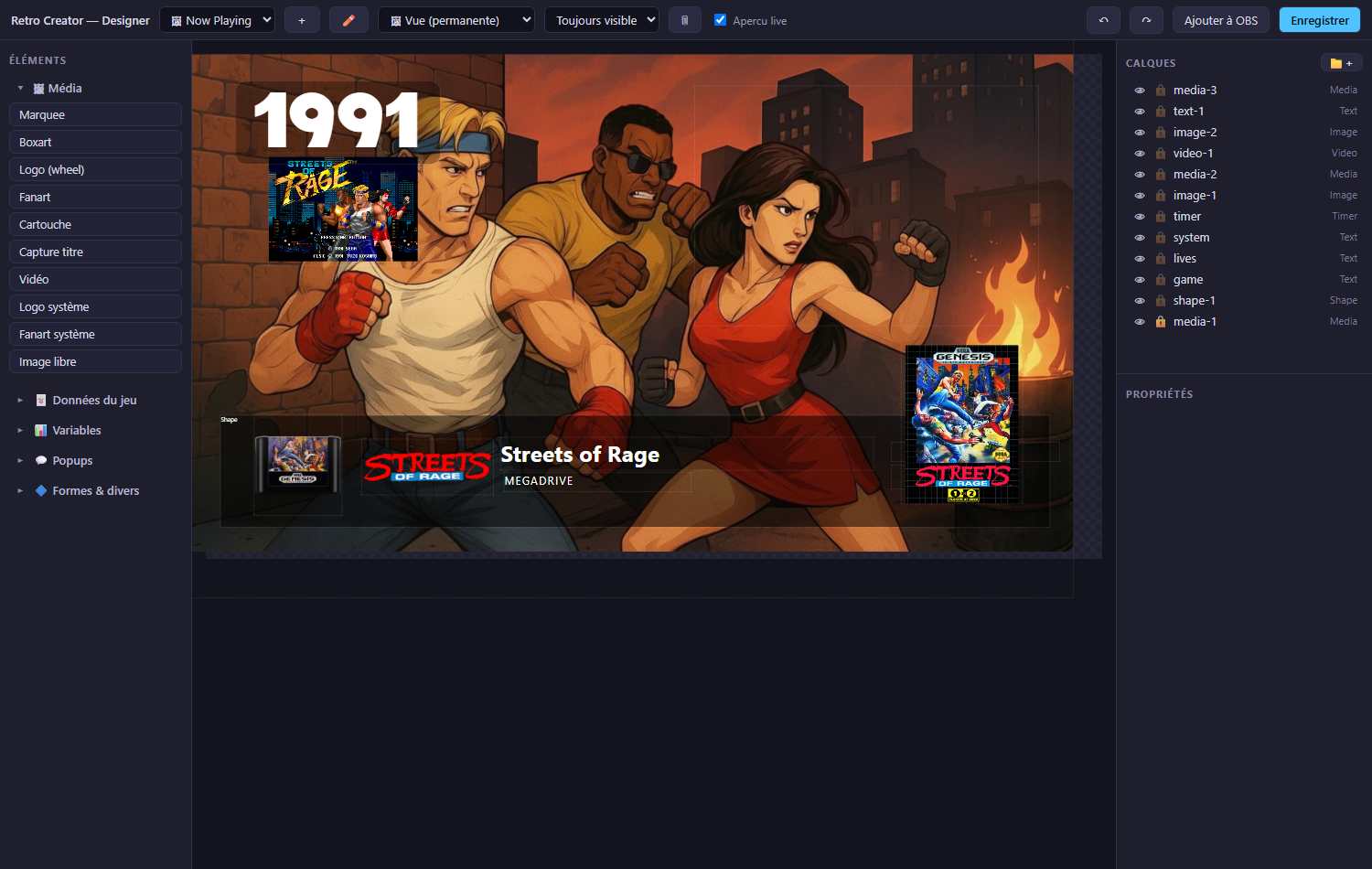
Documents: views, popups, components
Every document has a type, selected in the header:
- 🖼 View (permanent) - an overlay that lives in your streaming software. It can be always visible, or only while browsing the menu / in game.
- 💬 Popup (temporary) - invisible by default; a Flow shows it for a few seconds (action show a popup → pick your popup).
- 🧩 Component - a reusable brick.
Create, rename or delete documents from the header buttons or the native Designer menu. Deleting warns you if the document is used by your flows.
Elements palette
Grouped by usage, every entry is a preset - it lands pre-configured:
-
Media - marquee, boxart, logo (wheel), fanart, cartridge, title shot, video, system logo, system marquee, system DMD, system fanart, free image.
A \"Now Playing\" corner in four clicks
Drop a Logo (wheel), a Year, a Rating ★ and a Composed text (
Released in {game.year} by {game.publisher}) - every element updates by itself when you browse to another game.- Game data - title, system name/code, year, genre, developer, publisher,
rating ★, description, manufacturer, system year, composed text
(
Released in {game.year} by {game.publisher}), free text. - Variables - score, timer, lives, coins/rings counter, last Twitch viewer, progress bar.
Under the hood - where live variables come from
Score and timer widgets are fed by APIExpose's live aggregators (
/ws/score,/ws/timer): raw game values are decoded (including BCD scores and composed minute+second timers) and normalized before they reach your overlay, so the number you display is the number the game actually shows. Lives and collectibles come from the same per-game event definitions that power the Flows.- Popups - the achievement popup, plus your own popups.
- Shapes - rectangle (with fill), input viewer.
- Game data - title, system name/code, year, genre, developer, publisher,
rating ★, description, manufacturer, system year, composed text
(
Your own files (folder set in Settings → My media) appear in the Media
source selector as user: entries.
Layers
- Drag & drop to reorder - z-order is managed automatically, two layers never share the same depth.
- 👁 hides a layer, 🔒 locks it (still selectable, not movable). Both work on whole folders too (📁+ to create one).
- Layers can be named (property layer name).
Properties
Three collapsible groups - the open/closed state is shared across layers:
- Layer - position, size, z, opacity, folder, fill (colour + opacity in %, rounded corners, padding - new text layers arrive with a discreet black 30 % background), and the update transition (none / fade / horizontal / vertical slide / pop) played each time the content changes.
- Content - the data binding (with suggestions), composed text, format
(
rating:starsturns 0.8 into ★★★★☆), fallback. - Style - font (system fonts or your own files dropped in the
fontsfolder next to the app), size, bold, colour, alignment, drop shadow (opt-in; either the view's global shadow shared by all layers, or a per-layer one) and stroke (outside / inside / centre, width, colour).
Live preview & OBS
Live preview is on by default - the canvas renders the real data and artwork of the current game, and refreshes when you change games in the menu.
Add to OBS saves the view then creates/updates a browser source named
RC - <view name> in the current OBS scene. The URL carries a fresh version
stamp at each push, so the streaming software never serves a cached page.