Welcome
MarqueeManager dresses your cabinet with screens that live with your RetroBat games: the marquee shows the selected game's logo, the topper follows along, the DMD animates like a pinball machine, and live scores, RetroAchievements and MAME lamps display in real time.
What MarqueeManager does
- Five display surfaces: marquee, topper, instruction card, DMD and LCD - each on the Windows screen of your choice.
- Virtual or physical DMD, your choice: a DMD window on any screen, or a real ZeDMD panel (and compatibles) with automatic firmware optimization and crisp 128×32 rendering - both display exactly the same content.
- Real time: live scores, timers, RetroAchievements notifications and challenges, MAME
.laylayout lamps. - Zero scraping: all media and data come from APIExpose - MarqueeManager contacts no external API and generates no media.
Where to start?
- Getting started - install MarqueeManager in 5 minutes.
- My setup - the map of your screens: one type per screen and everything works.
- DMD and ZeDMD - tune your DMD, virtual or physical.
- Troubleshooting - solutions to common issues.
How it works
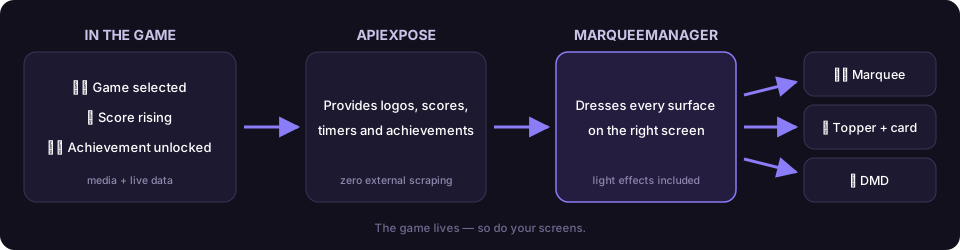
Under the hood - the full pipeline
APIExpose (media + data, real time)
   → MarqueeManager (WebSockets /ws/marquee, /ws/topper, /ws/score…)
      → WPF surfaces (marquee, topper, iccard, virtual dmd, lcd)
      → optional physical DMD (dmd/zedmd DLLs + dmdext for video)
MarqueeManager is part of the RetroBat plugin family together with APIExpose (the data engine, required) and LedManager (LED buttons and panels).